
References
https://learn.microsoft.com/en-us/deployoffice/outlook/get-started/deployment-new-outlook
Overview

With the recent introduction of the New Outlook, our organisation needed a method to determine:
- Who has selected the “Try New Outlook Toggle”?
- Secondly, who has reverted back to the previous version of Outlook after trying the new version?
For this solution I’ve configured a Powershell script to be deployed as an SCCM/MEM Run Script.
How To Use
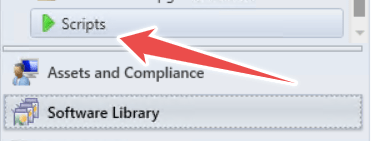
Create a new script under the “Scripts” node in Microsoft Endpoint Manager. Copy and Paste the script from the next heading here.
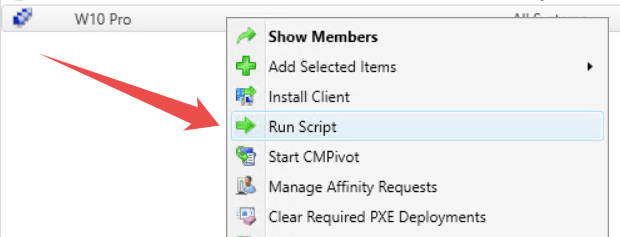
Deploy the script against a Collection to gather the results. Values returned are:
- Device Name
- Username
- IsNewOutlookEnabled (1= Yes, 0=No)
An empty entry means that “New” Outlook hasn’t been enabled.
The results are illustrated in the image below. Select Ctrl A > Ctrl C to copy the data into a spreadsheet or similar for reporting.

Script
This file contains hidden or bidirectional Unicode text that may be interpreted or compiled differently than what appears below. To review, open the file in an editor that reveals hidden Unicode characters.
Learn more about bidirectional Unicode characters
| #Test_IsNewOutlookEnabled | |
| #To be entered as an SCCM/MEM Run Script | |
| #Contact | Joshua Woods | joshua@jwblog.uk | |
| #Test if New Outlook has been installed by displaying the user list | |
| $Users = (Get-AppxPackage Microsoft.OutlookForWindows -allusers).PackageUserInformation.UserSecurityId | |
| #Test if a value is returned | |
| if ($Users) { | |
| #Check Registry value for each user. This is to determine is New Outlook is still enabled following the install (The install is initiated by selecting the toggle to enable new Outlook) | |
| foreach ($User in $Users) { | |
| #Reset variables | |
| $Reg = $null | |
| #Get Reg Key to check for active use. | |
| $Reg = (Get-ItemProperty -Path "Registry::HKEY_USERS\$($User.SID)\SOFTWARE\Microsoft\Office\16.0\Outlook\Preferences" -Name "UseNewOutlook").UseNewOutlook | |
| #Write Result to SCCM Run Script Output (Username,UseNewOutlookValue) | |
| Write-Host "$($User.Username),$Reg," | |
| } | |
| } |
 JW Blog