
*November 2025 Update – This has been extended to include additional attributes, including the product, description, version, path etc.
Background
In preparation for our organisations upgrade to Windows 11, we were looking for a method to monitor applications that are in active use. I had considered using SCCM/MEM’s Software Metering feature to achieve this, but it requires specifying specific exe’s to monitor.
We needed to monitor all applications. We also wanted a minimal approach to the dataset collected. Software Metering monitors each application launch and closure. Across thousands of devices, this could result in an unnecessarily massive dataset.
As an alternative, I’ve configured the following:
Overview
A Powershell script configured as an SCCM/MEM Configuration Baseline to collect a list of all running processes under the currently logged on users security context.
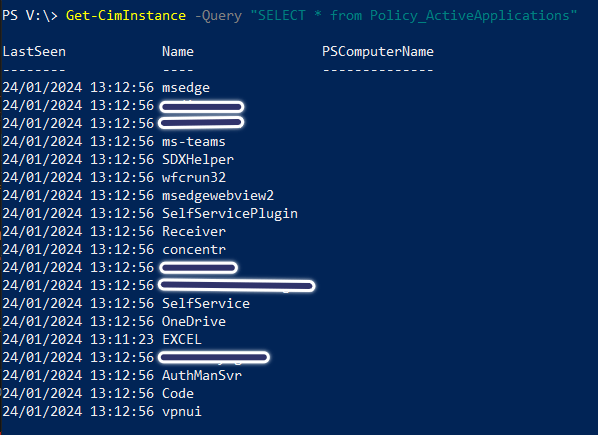
In this example, I configure the script to run every hour. If the process is seen, the application name and current time is stored under a custom WMI Class. Any application entries that haven’t been seen in more than 30 days are removed from the endpoints WMI Store.
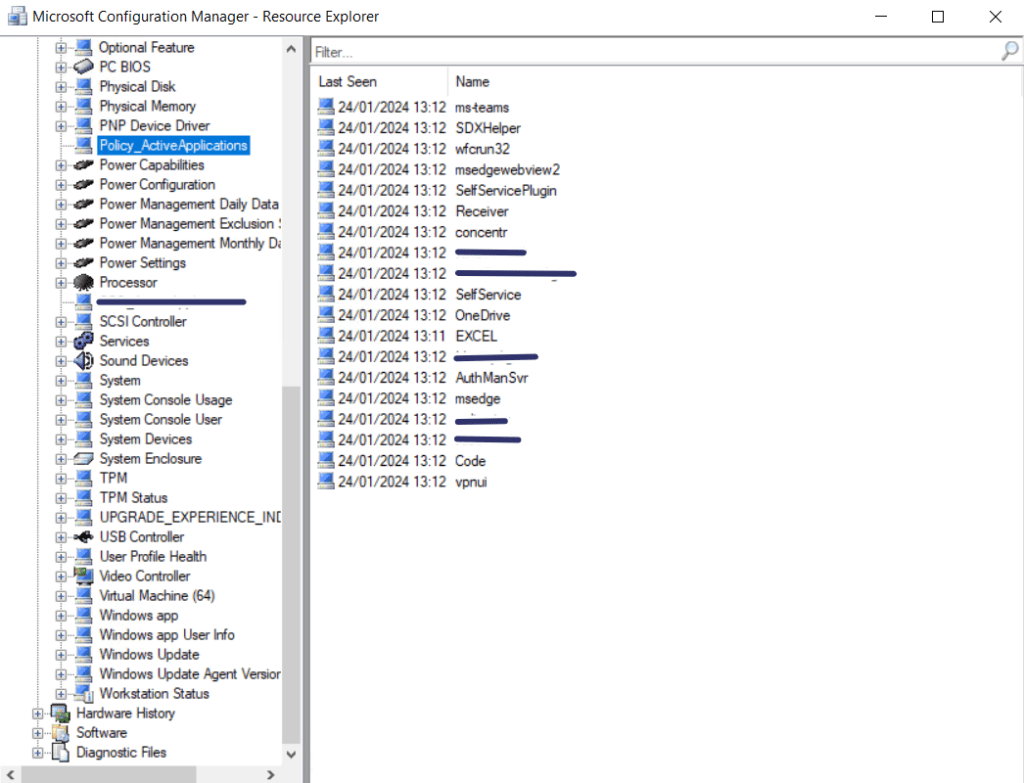
This data can be collected through SCCM/MEM’s Hardware Inventory feature for reporting.
Endpoint WMI Class Example
WMI Class as Displayed in SCCM/MEM’s Hardware Inventory
Breakdown
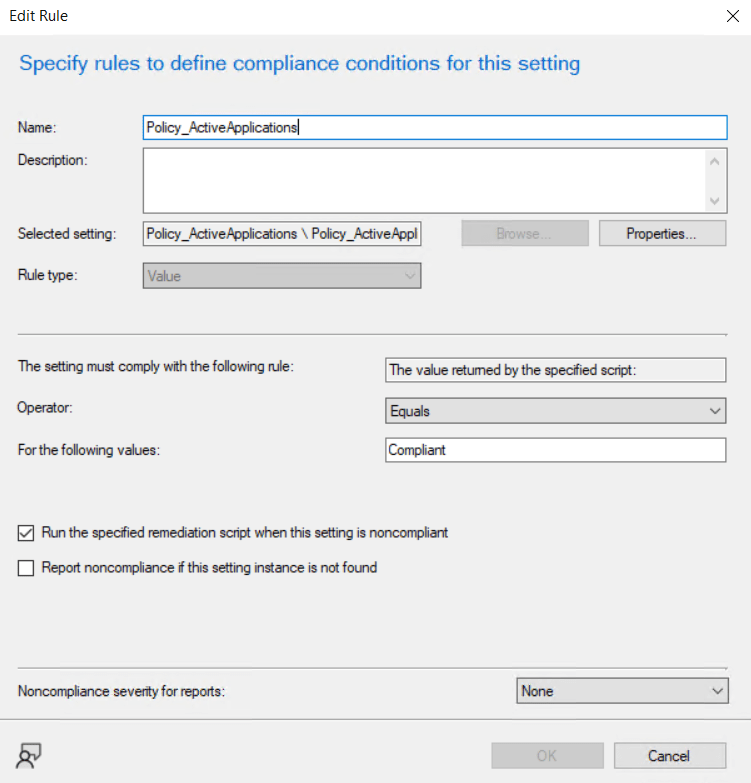
This solution follows the principles set by SCCM/MEM Configuration Baselines. When configuring the baseline, set the compliance rule as follows:
Extend SCCM/MEM’s Hardware inventory to include the new custom WMI class named Policy_ActiveApplications. See here for more info on how you can achieve this.
Check out the notes from the two scripts below to get a further understanding of how this works.
As always, if you have any questions, please drop a comment below.
Discovery Script
| ##Policy ActiveApplications | |
| #Sets custom values from Get-Process in WMI to use with SCCM Hardware Inventory | Gets open applications for the current interactive user. | |
| #Discovery Script | |
| #Version | 1.2 | |
| #Contact | Josh Woods | joshua@jwblog.uk | |
| ################### | |
| #Variables | |
| ################### | |
| #Configuration | |
| $Version = "1.2" | |
| $Date = Get-Date -Format "dd-MM-yyyy HH" | |
| #Last Run Date | |
| $TestReg = Get-ItemProperty 'HKLM:\Software\Software Distribution' -Name Policy_ActiveApplications_Date | Select-Object -ExpandProperty Policy_ActiveApplications_Date | |
| #Stop Install on Error and output to log | |
| try { | |
| #Log | |
| #Start Log Transcript | |
| Start-Transcript -Path "C:\Windows\Logs\Policy_ActiveApplications_Discovery_$Version.txt" -append | Out-Null | |
| if ($TestReg -eq $Date) { | |
| Write-Host "Compliant" | |
| } | |
| else { | |
| Write-Host "Non-Compliant" | |
| } | |
| } | |
| catch { | |
| #Failed. Write error and exit. | |
| Write-Output "Error: $($_.Exception.Message)" | |
| #Output Logs to File | |
| Stop-Transcript | |
| } |
Remediation Script
| #Policy ActiveApplications Remediation | |
| # Sets custom values from Get-Process in WMI to use with SCCM Hardware Inventory. | |
| # Gets open applications for the current interactive user. | |
| # Contact | Josh Woods | joshua@jwblog.uk | |
| # Version 1.2 | |
| #Notes | |
| ##Delete WMI Class Example | |
| #[System.Management.ManagementClass]::new('Policy_ActiveApplications').Delete() | |
| ##Useful Queries | |
| #Get-CimInstance -Query "SELECT * from Policy_ActiveApplications" | |
| #Get-WmiObject -Namespace "root/cimv2" -List | where-object name -like "*Policy_ActiveApplications*" | |
| # Run only if a user is logged on | |
| if (Get-CimInstance -ClassName Win32_ComputerSystem | Select-Object -ExpandProperty UserName) { | |
| # — Prerequisites — | |
| $regPath = 'HKLM:\Software\Software Distribution' | |
| if (-not (Test-Path $regPath)) { | |
| New-Item -Path $regPath -Force | Out-Null | |
| } | |
| # — Variables — | |
| $Version = "1.2" | |
| $Date = Get-Date -Format "dd-MM-yyyy" | |
| $WMIDate = Get-Date | |
| $Class = "Policy_ActiveApplications" | |
| $DataFromDate = (Get-Date).AddDays(-30) | |
| $WQLDate = $DataFromDate.ToString("yyyy-MM-dd") # consistent date format | |
| # — Start Transcript — | |
| try { | |
| $logPath = "C:\Windows\Logs\Policy_ActiveApplications_Remediation_$Version.txt" | |
| Start-Transcript -Path $logPath -Append | |
| # — Registry version tracking — | |
| New-ItemProperty -Path $regPath -Name Policy_ActiveApplications_Date -Value $Date -Force | Out-Null | |
| $TestReg = (Get-ItemProperty $regPath -Name Policy_ActiveApplications -ErrorAction SilentlyContinue).Policy_ActiveApplications | |
| # — Handle version change — | |
| if ($TestReg -ne $Version) { | |
| Write-Output "Client version changed or missing. Updating to version $Version." | |
| # Remove old WMI class if it exists | |
| try { | |
| if (Get-CimClass -ClassName $Class -ErrorAction SilentlyContinue) { | |
| ([wmiclass]"root\cimv2:$Class").Delete() | |
| Write-Output "Old WMI class removed." | |
| } | |
| } catch { | |
| Write-Warning "Failed to remove existing WMI class: $($_.Exception.Message)" | |
| } | |
| # Write new version | |
| New-ItemProperty -Path $regPath -Name Policy_ActiveApplications -Value $Version -Force | Out-Null | |
| } else { | |
| Write-Output "Client version matches $Version." | |
| } | |
| # — Create WMI class if not present — | |
| if (-not (Get-CimClass -ClassName $Class -ErrorAction SilentlyContinue)) { | |
| Write-Output "Creating new WMI class: $Class" | |
| $newClass = New-Object System.Management.ManagementClass("root\cimv2", [String]::Empty, $null) | |
| $newClass["__CLASS"] = $Class | |
| $newClass.Qualifiers.Add("Static", $true) | |
| # Define properties | |
| $newClass.Properties.Add("Name", [System.Management.CimType]::String, $false) | |
| $newClass.Properties["Name"].Qualifiers.Add("key", $true) | |
| $newClass.Properties["Name"].Qualifiers.Add("read", $true) | |
| $props = @( | |
| "Username", "Product", "ProductVersion", | |
| "Description", "Path", "LastSeen" | |
| ) | |
| foreach ($p in $props) { | |
| $type = if ($p -eq "LastSeen") { [System.Management.CimType]::DateTime } else { [System.Management.CimType]::String } | |
| $newClass.Properties.Add($p, $type, $false) | |
| # Only the key should be read-only | |
| if ($p -ne "LastSeen" -and $p -ne "Product" -and $p -ne "ProductVersion" -and $p -ne "Description" -and $p -ne "Path" -and $p -ne "Username") { | |
| $newClass.Properties[$p].Qualifiers.Add("read", $true) | |
| } | |
| } | |
| $newClass.Put() | Out-Null | |
| Write-Output "WMI class $Class created successfully." | |
| } else { | |
| Write-Output "WMI class $Class already exists." | |
| } | |
| # — Cleanup old entries (>30 days) — | |
| $oldEntries = Get-CimInstance -ClassName $Class -ErrorAction SilentlyContinue | Where-Object { $_.LastSeen -lt $DataFromDate } | |
| if ($oldEntries) { | |
| $oldEntries | Remove-CimInstance | |
| Write-Output "Old WMI entries older than 30 days removed." | |
| } | |
| # — Collect running processes for current user — | |
| $Username = (Get-CimInstance Win32_ComputerSystem).UserName | |
| $Processes = Get-Process -IncludeUserName -ErrorAction SilentlyContinue | Where-Object { | |
| $_.UserName -eq $Username -and $_.Path -and $_.Path -notlike "C:\Windows*" | |
| } | |
| # Get all current WMI entries to check against | |
| $currentWMIEntries = Get-CimInstance -ClassName $Class -ErrorAction SilentlyContinue | |
| foreach ($Proc in $Processes) { | |
| try { | |
| $fileInfo = $Proc.MainModule.FileVersionInfo | |
| $Product = $fileInfo.ProductName | |
| $ProductVersion = $fileInfo.ProductVersion | |
| $Description = $fileInfo.FileDescription | |
| } catch { | |
| $Product = "" | |
| $ProductVersion = "" | |
| $Description = "" | |
| } | |
| # Prepare properties | |
| $props = @{ | |
| Name = $Proc.Name | |
| Username = $Proc.UserName | |
| Product = $Product | |
| ProductVersion = $ProductVersion | |
| Description = $Description | |
| Path = $Proc.Path | |
| LastSeen = (Get-Date) | |
| } | |
| # Find existing instance | |
| $existing = $currentWMIEntries | Where-Object { | |
| $_.Name -eq $Proc.Name -and | |
| $_.Username -eq $Proc.UserName -and | |
| $_.Path -eq $Proc.Path | |
| } | |
| if ($existing) { | |
| # — Update existing entry's LastSeen and metadata — | |
| $existing | Set-CimInstance -Property @{ | |
| Product = $Product | |
| ProductVersion = $ProductVersion | |
| Description = $Description | |
| LastSeen = (Get-Date) | |
| } -ErrorAction SilentlyContinue | |
| Write-Output "Updated LastSeen for $($Proc.Name)" | |
| } else { | |
| # — Create new entry — | |
| New-CimInstance -ClassName $Class -Property $props -ErrorAction SilentlyContinue | Out-Null | |
| Write-Output "Added new entry for $($Proc.Name)" | |
| } | |
| } | |
| Write-Output "Policy_ActiveApplications remediation completed successfully." | |
| } catch { | |
| Write-Error "Remediation script failed: $($_.Exception.Message)" | |
| } finally { | |
| Stop-Transcript | Out-Null | |
| } | |
| } else { | |
| Write-Output "No logged-on user detected. Script skipped." | |
| } |
Query
| <# | |
| Export-ActiveApplications.ps1 | |
| Exports all collected WMI entries from SCCM Hardware Inventory | |
| for the custom class Policy_ActiveApplications | |
| Requirements: | |
| • Runs on the SCCM Site Server | |
| • Requires ConfigurationManager PowerShell module | |
| #> | |
| param( | |
| [string]$SiteCode = "ABC", # <– CHANGE to your site code | |
| [string]$ServerName = "ServerName", # <– CHANGE to your server name | |
| [string]$OutputPath = "C:\Temp\ActiveApplications.csv" | |
| ) | |
| # Import SCCM module | |
| Import-Module "$($ENV:SMS_ADMIN_UI_PATH)\..\ConfigurationManager.psd1" -Force | |
| # Change to SCCM PSDrive | |
| Set-Location "$SiteCode`:" | |
| Write-Host "Querying SCCM for Policy_ActiveApplications data…" -ForegroundColor Cyan | |
| # Query the hardware inventory view SCCM generates | |
| # (This is the class SCCM automatically creates after syncing inventory) | |
| $results = Get-CimInstance -Namespace "root\sms\site_$SiteCode" -ComputerName $ServerName -ClassName "SMS_G_System_POLICY_ACTIVEAPPLICATIONS" | |
| if (-not $results) { | |
| Write-Warning "No data found in SMS_G_System_POLICY_ACTIVEAPPLICATIONS. | |
| Make sure clients have performed hardware inventory." | |
| exit | |
| } | |
| # Expand results into CSV-friendly objects | |
| $export = foreach ($entry in $results) { | |
| [PSCustomObject]@{ | |
| ResourceID = $entry.ResourceID | |
| Name = $entry.Name | |
| Username = $entry.Username | |
| Product = $entry.Product | |
| ProductVersion = $entry.ProductVersion | |
| Description = $entry.Description | |
| Path = $entry.Path | |
| LastSeen = $entry.LastSeen | |
| } | |
| } | |
| Write-Host "Exporting $($export.Count) records to CSV…" -ForegroundColor Cyan | |
| $export | Export-Csv -Path $OutputPath -NoTypeInformation -Encoding UTF8 | |
| Write-Host "Export completed successfully:" | |
| Write-Host $OutputPath -ForegroundColor Green |
 JW Blog