
References
https://learn.microsoft.com/en-us/powershell/module/cimcmdlets/new-ciminstance?view=powershell-7.4
http://sccmshenanigans.blogspot.com/2013/11/custom-wmi-classes-and-reporting-into.html
Background
This idea spurred from an ever-ongoing requirement to pro-actively report on and remediate issues with Windows endpoints in our environment.
Recently, we’ve come across a number of devices experiencing a stop-error (BSOD) following an application deployment. I began reporting on these by using the Get-EventLog cmdlet in PowerShell alongside the Run Script feature in Microsoft Endpoint Manager.
However, this is only useful for devices in an online state at the time of running the script. It’d be far more useful to collect and centrally store historical error information from endpoints, for use in reports such as Power BI.
With that said, here’s what I’ve decided to do:
Overview
A PowerShell script configured to store selected Event Logs in each Windows 10 endpoint WMI store under a custom Class.
Deployed as a Configuration Baseline in Microsoft Endpoint Manager, we’re using Hardware Inventory to store our data for reporting.
Breakdown
I won’t be running through everything here, but I’ll highlight some of the primary functions to help you understand how this works. If you have any questions, please drop a comment below.
- Specify how much data you’d like to store by date. In this example, data older than 30 days won’t be queried or saved. This keeps the data clean both on your endpoint, and as part of Microsoft Endpoint Managers Hardware Inventory.
| #Collection Date from | |
| $DataFromDate = (Get-Date).AddDays(-30) #Used to Filter event logs. Event log data over 30 days old will not be queried. | |
| $DataCollectionTime = Get-Date -Format "dd/MM/yyyy HH:mm" #Current Date and time for logging each time the configuration baseline is run on an endpoint | |
| $WQLDate = $DataFromDate.ToString("dd-MM-yyyy") #To be used for WQL query filtering. Used alongside the cleanup parameters to remove Custom_EventLogs WMI data on endpoints which is older than 30 days. |
- Our $Items variable stores data we’ll use to query the appropriate event logs. In our example below, we’re querying two sets of data. Properties include:
- Name | Identifying item name of your choosing.
- LogName | Name of the event log to retreive data from. For example, System, Setup or Application.
- Source | Event Log Source.
- Message | Event Log Message.
- GetQuery | WQL query used to find existing event log data in WMI which has been created previously using this script.
- Cleanup | WQL query used to cleanup existing event log data in WMI which has been created previously using this script.
- Use these properties to query the appropriate data. Keep in mind that you likely don’t want to
| $Items = @( | |
| [pscustomobject]@{Name='BugCheck';LogName='System';Source='BugCheck';Message='';GetQuery='Get-CimInstance -Query "Select * from Custom_EventLogs where Source = ''BugCheck''"';Cleanup='Remove-CimInstance -Query "Select * from Custom_EventLogs where Source = ''BugCheck'' and TimeGenerated < ''' + $WQLDate + '''"'} | |
| [pscustomobject]@{Name='UnexpectedShutdown';LogName='System';Source='EventLog';Message='The previous system shutdown';GetQuery='Get-CimInstance -Query "Select * from Custom_EventLogs where Source = ''EventLog'' and Message LIKE ''%The previous system shutdown%''"';Cleanup='Remove-CimInstance -Query "Select * from Custom_EventLogs where Source = ''EventLog'' and Message LIKE ''%The previous system shutdown%'' and TimeGenerated < ''' + $WQLDate + '''"'} | |
| ) |
- The following snippet creates a new WMI Class to store our event log data. We’re using the ManagementClass in Net Framework to achieve this.
| #Create WMI Class if it doesn't already exist | |
| if (-not (Get-WmiObject -Class $Class)) { | |
| #New WMI Class | |
| $newClass = New-Object System.Management.ManagementClass("root\cimv2", [String]::Empty, $null); | |
| $newClass["__CLASS"] = "$Class"; | |
| $newClass.Qualifiers.Add("Static", $true) | |
| $newClass.Properties.Add("Index", [System.Management.CimType]::String, $false) | |
| $newClass.Properties["Index"].Qualifiers.Add("key", $true) | |
| $newClass.Properties["Index"].Qualifiers.Add("read", $true) | |
| $newClass.Properties.Add("LogName", [System.Management.CimType]::String, $false) | |
| $newClass.Properties["LogName"].Qualifiers.Add("key", $true) | |
| $newClass.Properties["LogName"].Qualifiers.Add("read", $true) | |
| $newClass.Properties.Add("Source", [System.Management.CimType]::String, $false) | |
| $newClass.Properties["Source"].Qualifiers.Add("key", $true) | |
| $newClass.Properties["Source"].Qualifiers.Add("read", $true) | |
| $newClass.Properties.Add("Message", [System.Management.CimType]::String, $false) | |
| $newClass.Properties["Message"].Qualifiers.Add("key", $true) | |
| $newClass.Properties["Message"].Qualifiers.Add("read", $true) | |
| $newClass.Properties.Add("TimeGenerated", [System.Management.CimType]::DateTime, $false) | |
| #$newClass.Properties.Add("TimeGenerated", [System.Management.CimType]::String, $false) | |
| $newClass.Properties["TimeGenerated"].Qualifiers.Add("key", $true) | |
| $newClass.Properties["TimeGenerated"].Qualifiers.Add("read", $true) | |
| $newClass.Properties.Add("Custom_DataCollectionTime", [System.Management.CimType]::String, $false) | |
| $newClass.Properties["Custom_DataCollectionTime"].Qualifiers.Add("key", $true) | |
| $newClass.Properties["Custom_dataCollectionTime"].Qualifiers.Add("read", $true) | |
| $newClass.Put() | |
| } | |
| else { | |
| Write-Output "WMI Class $Class already exists" | |
| } |
- The following snippet works through our defined properties to query data and cleanup old WMI data on our endpoints.
| #Update WMI Class | |
| foreach ($Item in $Items) { | |
| #Set Variables to Null | |
| $CurrentEntries = $null | |
| #Cleanup Current SCO_EventsLogs WMI Entries on endpoint (Older than 30 Days) | |
| Invoke-Expression $Item.Cleanup | |
| #Gets a list of current WMI entries on the endpoint. To be used in conjunction with the new-ciminstance further down. If an entry already exists, a new one won't be added. | |
| $CurrentEntries = Invoke-Expression $Item.GetQuery | |
| #Get Event Logs | |
| $Events = Get-EventLog -LogName "$($Item.LogName)" -After $DataFromDate | |
| if ($Item.Source) { | |
| $Events = $Events | where-object Source -eq "$($Item.Source)" | |
| } | |
| if ($Item.Message) { | |
| $Events = $Events | where-object Message -like "*$($Item.Message)*" | |
| } | |
| #Write to log | |
| Write-Output "Discovered $($Events.count) events for item $($Item.Name)" | |
| foreach ($Event in $Events) { | |
| #Set Variables to Null | |
| $ExistingValue = $null | |
| #Check if item already exists by iterating through array of objects | |
| foreach ($Object in $CurrentEntries) { | |
| if ($Object.Index -contains $Event.Index) { | |
| $ExistingValue = $true | |
| break | |
| } | |
| else { | |
| $ExistingValue = $false | |
| } | |
| } | |
| #Create WMI Instance | Only if an item does not already exist. | |
| if ($ExistingValue -eq $true) { | |
| Write-Output "Item already exists – Skipping | $($Event.Index) | $($Event.Source) | $($Event.TimeGenerated)" | |
| } | |
| else { | |
| #Convert DatTime Value to WMI Supported value | |
| New-CimInstance -ClassName "$Class" -Property @{Index="$($Event.Index)";LogName="$($Item.Logname)";Source="$($Event.Source)";Message="$($Event.Message)";TimeGenerated=$($Event.TimeGenerated);Custom_DataCollectionTime="$DataCollectionTime"} | Out-Null | |
| } | |
| } | |
| } |
Scripts | Configuration Baselines
- Configure your Configuration Baseline PowerShell scripts. I recommend setting a basic frequency of once per day.
- See the Microsoft article here if you need more information on how to configure a Configuration Baseline.
Discovery Script
| ##Policy Custom Event Logs | |
| #Sets custom values from Windows Event Logs in WMI to use with SCCM Hardware Inventory | |
| #Discovery Script | |
| #Version | 1.0 | |
| #Contact | Josh Woods | joshua@jwblog.uk | |
| ################### | |
| #Variables | |
| ################### | |
| #Configuration | |
| $Version = "1.0" | |
| #Stop Install on Error and output to log | |
| try { | |
| #Log | |
| #Start Log Transcript | |
| Start-Transcript -Path "C:\Windows\Logs\Policy_CustomEventLogs_Discovery_Pilot_$Version.txt" -append | Out-Null | |
| Write-Host "Non-Compliant" | |
| } | |
| catch { | |
| #Failed. Write error and exit. | |
| Write-Output "Error: $($_.Exception.Message)" | |
| #Output Logs to File | |
| Stop-Transcript | |
| } |
Remediation Script
| #Policy Custom Event Logs Remediation | |
| #Sets custom values from Windows Event Logs in WMI to use with SCCM Hardware Inventory | |
| #Remediation Script | |
| #Contact | Josh Woods | joshua@jwblog.uk | |
| #References | |
| #https://learn.microsoft.com/en-us/powershell/module/cimcmdlets/new-ciminstance?view=powershell-7.4 | |
| #http://sccmshenanigans.blogspot.com/2013/11/custom-wmi-classes-and-reporting-into.html | |
| #https://learn.microsoft.com/en-us/dotnet/api/system.management.managementclass?view=dotnet-plat-ext-8.0 | |
| #Notes | |
| ##Delete WMI Class | |
| #[System.Management.ManagementClass]::new('Custom_EventLogs').Delete() | |
| ##Useful Queries | |
| #Get-CimInstance -Query "SELECT * from Custom_EventLogs" | |
| #Get-WmiObject -Namespace "root/cimv2" -List | |
| #Get-CimInstance -Query "SELECT * from Custom_EventLogs WHERE Source = 'Kerberos'" | format-table | |
| #Variables | |
| $Version = "1.1" | |
| try { | |
| #Version Control | |
| #Test if the version Registry Item exists and create a new entry if it doesn't | |
| $TestReg = Get-ItemProperty 'HKLM:\Software\Software Distribution' -Name Policy_SCOEventLogs | Select-Object -ExpandProperty Policy_SCOEventLogs | |
| if ($TestReg -eq $Version){ | |
| Write-Output "Client Version Matches last run value | $Version" | |
| } | |
| Else { | |
| #Update Registry to new version value | |
| Write-Output "Client Version does not Matche last run value. Updating to version | $Version" | |
| #Remove existing class | |
| [System.Management.ManagementClass]::new('Custom_EventLogs').Delete() | |
| #Write Version Registry Value | |
| New-ItemProperty -Path 'HKLM:\Software\Software Distribution' -Name Policy_SCOEventLogs -Value $Version -Force | |
| } | |
| #Start Log Transcript | |
| Start-Transcript -Path "C:\Windows\Logs\Policy_SCOEventLogs_Pilot_$Version.txt" -append | |
| #Collection Date from | |
| $DataFromDate = (Get-Date).AddDays(-30) #Used to Filter event logs. Event log data over 30 days old will not be queried. | |
| $DataCollectionTime = Get-Date -Format "dd/MM/yyyy HH:mm" #Current Date and time for logging each time the configuration baseline is run on an endpoint | |
| $WQLDate = $DataFromDate.ToString("dd-MM-yyyy") #To be used for WQL query filtering. Used alongside the cleanup parameters to remove Custom_EventLogs WMI data on endpoints which is older than 30 days. | |
| #Class | |
| $Class = "Custom_EventLogs" | |
| #Variables to use for querying and sanitising WMI data. | |
| #Each entry represents a set of logs to collect from event viewer. | |
| #For example, our first entry queries the System logs and filters by events from source "BugCheck". The "GetQuery" property specifies how we query our existing entries, and the "Cleanup" property is used to remove old data (In this case, data older than 30 days) | |
| $Items = @( | |
| [pscustomobject]@{Name='BugCheck';LogName='System';Source='BugCheck';Message='';GetQuery='Get-CimInstance -Query "Select * from Custom_EventLogs where Source = ''BugCheck''"';Cleanup='Remove-CimInstance -Query "Select * from Custom_EventLogs where Source = ''BugCheck'' and TimeGenerated < ''' + $WQLDate + '''"'} | |
| [pscustomobject]@{Name='UnexpectedShutdown';LogName='System';Source='EventLog';Message='The previous system shutdown';GetQuery='Get-CimInstance -Query "Select * from Custom_EventLogs where Source = ''EventLog'' and Message LIKE ''%The previous system shutdown%''"';Cleanup='Remove-CimInstance -Query "Select * from Custom_EventLogs where Source = ''EventLog'' and Message LIKE ''%The previous system shutdown%'' and TimeGenerated < ''' + $WQLDate + '''"'} | |
| ) | |
| #Create WMI Class if it doesn't already exist | |
| if (-not (Get-WmiObject -Class $Class)) { | |
| #New WMI Class | |
| $newClass = New-Object System.Management.ManagementClass("root\cimv2", [String]::Empty, $null); | |
| $newClass["__CLASS"] = "$Class"; | |
| $newClass.Qualifiers.Add("Static", $true) | |
| $newClass.Properties.Add("Index", [System.Management.CimType]::String, $false) | |
| $newClass.Properties["Index"].Qualifiers.Add("key", $true) | |
| $newClass.Properties["Index"].Qualifiers.Add("read", $true) | |
| $newClass.Properties.Add("LogName", [System.Management.CimType]::String, $false) | |
| $newClass.Properties["LogName"].Qualifiers.Add("key", $true) | |
| $newClass.Properties["LogName"].Qualifiers.Add("read", $true) | |
| $newClass.Properties.Add("Source", [System.Management.CimType]::String, $false) | |
| $newClass.Properties["Source"].Qualifiers.Add("key", $true) | |
| $newClass.Properties["Source"].Qualifiers.Add("read", $true) | |
| $newClass.Properties.Add("Message", [System.Management.CimType]::String, $false) | |
| $newClass.Properties["Message"].Qualifiers.Add("key", $true) | |
| $newClass.Properties["Message"].Qualifiers.Add("read", $true) | |
| $newClass.Properties.Add("TimeGenerated", [System.Management.CimType]::DateTime, $false) | |
| #$newClass.Properties.Add("TimeGenerated", [System.Management.CimType]::String, $false) | |
| $newClass.Properties["TimeGenerated"].Qualifiers.Add("key", $true) | |
| $newClass.Properties["TimeGenerated"].Qualifiers.Add("read", $true) | |
| $newClass.Properties.Add("Custom_DataCollectionTime", [System.Management.CimType]::String, $false) | |
| $newClass.Properties["Custom_DataCollectionTime"].Qualifiers.Add("key", $true) | |
| $newClass.Properties["Custom_dataCollectionTime"].Qualifiers.Add("read", $true) | |
| $newClass.Put() | |
| } | |
| else { | |
| Write-Output "WMI Class $Class already exists" | |
| } | |
| #Update WMI Class | |
| foreach ($Item in $Items) { | |
| #Set Variables to Null | |
| $CurrentEntries = $null | |
| #Cleanup Current SCO_EventsLogs WMI Entries on endpoint (Older than 30 Days) | |
| Invoke-Expression $Item.Cleanup | |
| #Gets a list of current WMI entries on the endpoint. To be used in conjunction with the new-ciminstance further down. If an entry already exists, a new one won't be added. | |
| $CurrentEntries = Invoke-Expression $Item.GetQuery | |
| #Get Event Logs | |
| $Events = Get-EventLog -LogName "$($Item.LogName)" -After $DataFromDate | |
| if ($Item.Source) { | |
| $Events = $Events | where-object Source -eq "$($Item.Source)" | |
| } | |
| if ($Item.Message) { | |
| $Events = $Events | where-object Message -like "*$($Item.Message)*" | |
| } | |
| #Write to log | |
| Write-Output "Discovered $($Events.count) events for item $($Item.Name)" | |
| foreach ($Event in $Events) { | |
| #Set Variables to Null | |
| $ExistingValue = $null | |
| #Check if item already exists by iterating through array of objects | |
| foreach ($Object in $CurrentEntries) { | |
| if ($Object.Index -contains $Event.Index) { | |
| $ExistingValue = $true | |
| break | |
| } | |
| else { | |
| $ExistingValue = $false | |
| } | |
| } | |
| #Create WMI Instance | Only if an item does not already exist. | |
| if ($ExistingValue -eq $true) { | |
| Write-Output "Item already exists – Skipping | $($Event.Index) | $($Event.Source) | $($Event.TimeGenerated)" | |
| } | |
| else { | |
| #Convert DatTime Value to WMI Supported value | |
| New-CimInstance -ClassName "$Class" -Property @{Index="$($Event.Index)";LogName="$($Item.Logname)";Source="$($Event.Source)";Message="$($Event.Message)";TimeGenerated=$($Event.TimeGenerated);Custom_DataCollectionTime="$DataCollectionTime"} | Out-Null | |
| } | |
| } | |
| } | |
| #Output Logs to File | |
| Stop-Transcript | |
| } | |
| catch { | |
| #Failed. Write error and exit. | |
| Write-Output "Error: $($_.Exception.Message)" | |
| #Output Logs to File | |
| Stop-Transcript | |
| } |
Hardware Inventory Synchronisation
This is required for syncing our custom WMI Event Log data to Microsoft Endpoint Manager.
- In Microsoft Endpoint Manager, navigate to Administration > Client Settings > Default Client Settings > Properties > Hardware Inventory > Set Classes
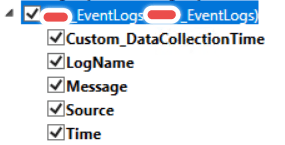
- Find your custom class and enable sync. | Note – You’ll need to deploy the Configuration Baseline or run the script on an endpoint before this will display as an option.
 JW Blog