
References
Checking for a range in Powershell – Stack Overflow
Sharing my function to convert array’s to hashtables. : r/PowerShell (reddit.com)
Overview
Peer Cache is a solution designed specifically for Microsoft Endpoint Configuration Manager. It’s used to share content between peers on a network, reducing the load on distribution points for large scale deployments such as software updates. More information on Peer Cache can be found here.
The script I’ve configured below is designed to extend the capabilities of Peer Cache by managing which clients are used as a download source. Microsoft include some predefined limitations here, however, I’ve configured some additional features with the intention to optimise performance and improve client maintenance. This includes:
- Restricting the type of client to be used as a Peer Cache Source to Desktops.
- Configuring only 5% of devices within a Boundary Group as a Peer Cache source.
- Requiring at least 100GB of available free disk space.
The criteria I’ve implemented here won’t be suitable for all environments, but feel free to look at how it works and it might prove useful.
How to use
- Configure your Boundary Groups according to your requirements. Boundary Groups are used to determine the scope of where clients can request content from, including Distribution Point and Peer Cache locations. For example, Boundary Groups are typically configured according to a subnet or IP Address Range.
- Create a new Collection named “Peer Cache” under your folder of choice.

- Create a Client Settings Policy under the Administration node to enable Peer Cache. Configure the settings noted in the screenshot below.
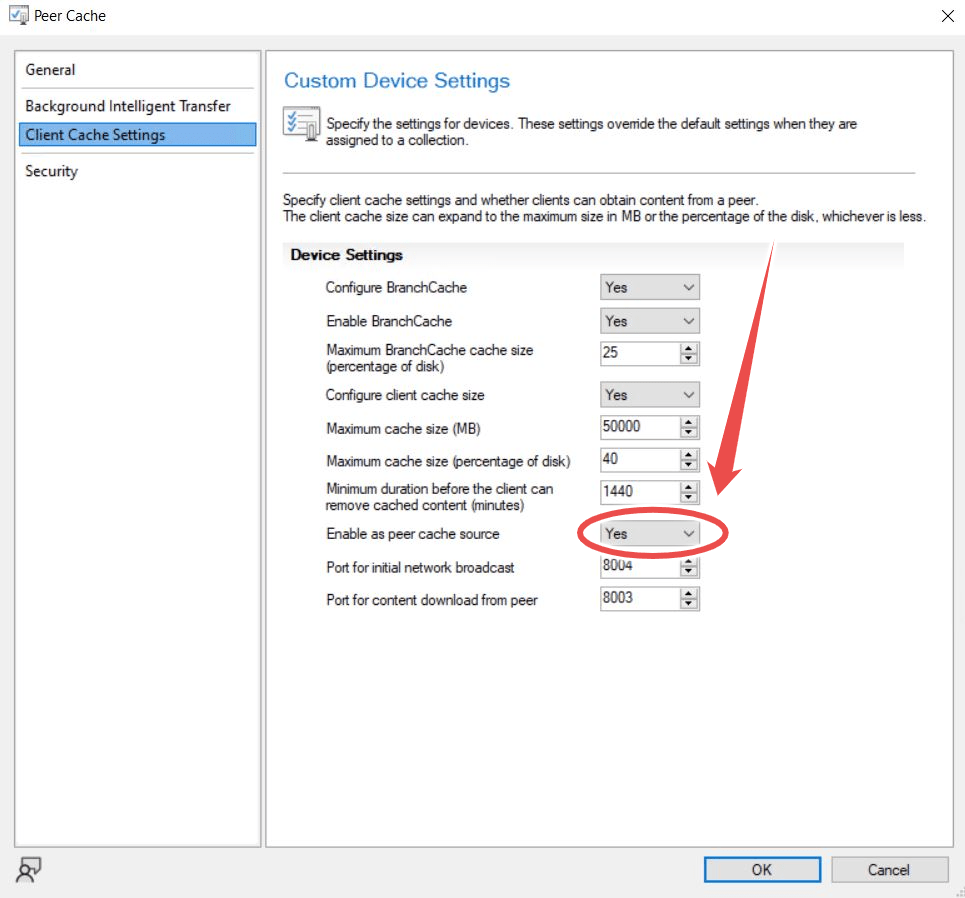
- Deploy your Client Settings to your previously created “Peer Cache” Collection.
Setting your script variables
- $SiteServerName – Hostname of your SCCM Site Server.
- $SiteCode – Set your SCCM Site Code.
- $SiteCodeWithColon – As previous with colon suffix.
Running the Script
- Run the script periodically to update the peer cache membership. I would recommend quarterly. You could also configure a Scheduled Task to automate this task. (Make sure to use a Service Account with the appropriate Permissions)
Script
| #SCCM_Automation_PeerCacheDevices | |
| #Generates a list of devices to be used for peer caching. Devices to be added to an SCCM collection which has client settings to enable peer cache. | |
| #Criteria | Desktops | 10% from each boundary | at least 100GB of free disk space | |
| #Contact | Josh Woods | joshua@jwblog.uk | |
| #Variables | |
| $SiteServerName = "ServerName" | |
| $SiteCode = "AAA" | |
| $SiteCodeWithColon = "AAA:" | |
| #Start Log | |
| Start-Transcript -Path "C:\Windows\Logs\SCCM_Automation_PeerCacheDevices.txt" -append | |
| #Functions | |
| Function ConvertTo-Hashtable ($Key,$Table){ | |
| $Hashtable = @{} | |
| Foreach ($Item in $Table) | |
| { | |
| $Hashtable[$Item.$Key.ToString()] = $Item | |
| } | |
| $Hashtable | |
| } | |
| function IsIpAddressInRange { | |
| param( | |
| [string] $ipAddress, | |
| [string] $fromAddress, | |
| [string] $toAddress | |
| ) | |
| $ip = [system.net.ipaddress]::Parse($ipAddress).GetAddressBytes() | |
| [array]::Reverse($ip) | |
| $ip = [system.BitConverter]::ToUInt32($ip, 0) | |
| $from = [system.net.ipaddress]::Parse($fromAddress).GetAddressBytes() | |
| [array]::Reverse($from) | |
| $from = [system.BitConverter]::ToUInt32($from, 0) | |
| $to = [system.net.ipaddress]::Parse($toAddress).GetAddressBytes() | |
| [array]::Reverse($to) | |
| $to = [system.BitConverter]::ToUInt32($to, 0) | |
| $from -le $ip -and $ip -le $to | |
| } | |
| #Set to SCCM Path | |
| # Check if MECM Admin Console path is defined as an environment variable | |
| $ConsolePath = [System.Environment]::GetEnvironmentVariable('SMS_ADMIN_UI_PATH', [System.EnvironmentVariableTarget]::Machine) | |
| if ($ConsolePath -ne $null) { | |
| #Remove i386 from path | |
| $ConsolePath = $ConsolePath.Replace("\i386","") | |
| #Set MECM Location to run cmdlets | |
| Set-Location $ConsolePath | |
| Import-Module .\ConfigurationManager.psd1 | |
| Set-Location $($SiteCodeWithColon) | |
| } else { | |
| Write-Host "The MECM Admin Console is not installed. Please install the Admin Console before running this script." | |
| Read-Host "Select any key to exit" | |
| Exit 1 | |
| } | |
| #Get Device list | Select properties Name,IP,FreeDiskspace,Type | |
| #ResourceID | |
| $Name = Get-ciminstance -Namespace ROOT\SMS\SITE_$($SiteCode) -ComputerName $($SiteServerName) -Query "select SMS_G_System_COMPUTER_SYSTEM.Name,SMS_G_System_COMPUTER_SYSTEM.ResourceID from SMS_G_System_COMPUTER_SYSTEM" | select-object Name, ResourceID | |
| #SystemType | |
| $SystemType = Get-ciminstance -Namespace ROOT\SMS\SITE_$($SiteCode) -ComputerName $($SiteServerName) -Query "select SMS_G_System_SYSTEM_ENCLOSURE.ResourceID, SMS_G_System_SYSTEM_ENCLOSURE.ChassisTypes from SMS_G_System_SYSTEM_ENCLOSURE" | select-object ResourceID, ChassisTypes | |
| #IPAddress | |
| $IPAddress = Get-ciminstance -Namespace ROOT\SMS\SITE_$($SiteCode) -ComputerName $($SiteServerName) -Query "select SMS_G_System_NETWORK_ADAPTER_CONFIGURATION.ResourceID, SMS_G_System_NETWORK_ADAPTER_CONFIGURATION.IPAddress from SMS_R_System inner join SMS_G_System_NETWORK_ADAPTER_CONFIGURATION on SMS_G_System_NETWORK_ADAPTER_CONFIGURATION.ResourceId = SMS_R_System.ResourceId" | select-object ResourceID, IPAddress | where-object IPAddress -ne $null | |
| $Array1Output = @() | |
| foreach ($Item in $IPAddress) { | |
| $NewIPAddress = ($Item.IPAddress -split ",")[0] | |
| $Array1 = New-Object PSObject | |
| $Array1 | Add-Member -MemberType NoteProperty -Name 'ResourceID' -Value $Item.ResourceID | |
| $Array1 | Add-Member -MemberType NoteProperty -Name 'IPAddress' -Value $NewIPAddress | |
| $Array1Output += $Array1 | |
| } | |
| $IPAddress = $Array1Output | |
| #Subnet Mask | |
| $SubnetMask = Get-ciminstance -Namespace ROOT\SMS\SITE_$($SiteCode) -ComputerName $($SiteServerName) -Query "select SMS_G_System_NETWORK_ADAPTER_CONFIGURATION.ResourceID, SMS_G_System_NETWORK_ADAPTER_CONFIGURATION.IPSubnet from SMS_R_System inner join SMS_G_System_NETWORK_ADAPTER_CONFIGURATION on SMS_G_System_NETWORK_ADAPTER_CONFIGURATION.ResourceID = SMS_R_System.ResourceId" | select-object ResourceID, IPSubnet | where-object IPSubnet -ne $null | |
| $Array1Output = @() | |
| foreach ($Item in $SubnetMask) { | |
| $NewSubnetMask = ($Item.IPSubnet -split ",")[0] | |
| $Array1 = New-Object PSObject | |
| $Array1 | Add-Member -MemberType NoteProperty -Name 'ResourceID' -Value $Item.ResourceID | |
| $Array1 | Add-Member -MemberType NoteProperty -Name 'IPSubnet' -Value $NewSubnetMask | |
| $Array1Output += $Array1 | |
| } | |
| $SubnetMask = $Array1Output | |
| #Disk Space | |
| $DiskSpace = Get-ciminstance -Namespace ROOT\SMS\SITE_$($SiteCode) -ComputerName $($SiteServerName) -Query "select SMS_G_System_LOGICAL_DISK.ResourceID, SMS_G_System_LOGICAL_DISK.FreeSpace, SMS_G_System_LOGICAL_DISK.Caption from SMS_R_System inner join SMS_G_System_LOGICAL_DISK on SMS_G_System_LOGICAL_DISK.ResourceId = SMS_R_System.ResourceId" | select-object ResourceID, FreeSpace, Caption | where-object Caption -eq C: | select-object ResourceID, Freespace | |
| #Convert to Hashtables | |
| #$Name2 = ConvertTo-Hashtable -Key "ResourceID" -Table $Name | |
| $SystemType2 = ConvertTo-Hashtable -Key "ResourceID" -Table $SystemType | |
| $IPAddress2 = ConvertTo-Hashtable -Key "ResourceID" -Table $IPAddress | |
| $DiskSpace2 = ConvertTo-Hashtable -Key "ResourceID" -Table $DiskSpace | |
| $SubnetMask2 = ConvertTo-Hashtable -Key "ResourceID" -Table $SubnetMask | |
| #All Properties | |
| $Array1Output = @() | |
| $ErrorActionPreference = "SilentlyContinue" | |
| foreach ($Item in $Name) { | |
| $NewSystemType = $SystemType2["$($Item.ResourceID)"] | select-object -expandproperty ChassisTypes | |
| $NewIPAddress = $IPAddress2["$($Item.ResourceID)"] | select-object -expandproperty IPAddress | |
| $NewDiskSpace = $DiskSpace2["$($Item.ResourceID)"] | select-object -expandproperty Freespace | |
| $NewSubnetMask = $SubnetMask2["$($Item.ResourceID)"] | select-object -expandproperty IPSubnet | |
| #Get IPSubnet | |
| $NewIPSubnet = Invoke-command {[IPAddress] (([IPAddress] "$NewIPAddress").Address -band ([IPAddress] "$NewSubnetMask").Address)} -ErrorAction SilentlyContinue | |
| $Array1 = New-Object PSObject | |
| $Array1 | Add-Member -MemberType NoteProperty -Name 'ResourceID' -Value $Item.ResourceID | |
| $Array1 | Add-Member -MemberType NoteProperty -Name 'Name' -Value $Item.Name | |
| $Array1 | Add-Member -MemberType NoteProperty -Name 'SystemType' -Value $NewSystemType | |
| $Array1 | Add-Member -MemberType NoteProperty -Name 'IPAddress' -Value $NewIPAddress | |
| $Array1 | Add-Member -MemberType NoteProperty -Name 'SubnetMask' -Value $NewSubnetMask | |
| $Array1 | Add-Member -MemberType NoteProperty -Name 'DiskSpace' -Value $NewDiskSpace | |
| $Array1 | Add-Member -MemberType NoteProperty -Name 'IPSubnet' -Value $NewIPSubnet | |
| $Array1Output += $Array1 | |
| } | |
| #All Values | |
| $Data = $Array1Output | |
| #Filter by Desktops | |
| $Data2 = $Data | where-object {($_.SystemType -eq 3) -or ($_.SystemType -eq 4) -or ($_.SystemType -eq 5) -or ($_.SystemType -eq 6) -or ($_.SystemType -eq 7) -or ($_.SystemType -eq 15) -or ($_.SystemType -eq 16)} | |
| #Filter by Disk Space (Over 100GB) | |
| $Data2 = $Data2 | where-object {$_.DiskSpace -gt 100000} | |
| #Select Items from each Subnet | |
| $Boundaries = Get-CMBoundary | |
| #Clear Existing Peer Cache Collection | |
| Remove-CMDeviceCollectionDirectMembershipRule -CollectionName "Peer cache" -ResourceName "*" -Force | |
| Start-Sleep -s 5 | |
| foreach ($Item in $Boundaries) { | |
| #Get Count of devices in MECM configured boundary group subnet | |
| if ($Item.BoundaryType -eq 0) { | |
| $SelectedBoundary = $Data2 | where-object {$_.IPSubnet -eq $Item.Value} | |
| } | |
| elseif ($Item.BoundaryType -eq 3) { | |
| $SelectedBoundary = @() | |
| $Addresses = $null | |
| $Addresses = $Item.Value -split "-" | |
| foreach ($Item2 in $Data2) { | |
| $Test = IsIpAddressInRange "$($Item2.IPAddress)" "$($Addresses[0])" "$($Addresses[1])" | |
| if ($Test -eq "true") { | |
| #$Array1 = New-Object PSObject | |
| #$Array1 | Add-Member -MemberType NoteProperty -Name 'ResourceID' -Value $Item2.ResourceID | |
| #$Array1 | Add-Member -MemberType NoteProperty -Name 'Name' -Value $Value1 | |
| #$Array1 | Add-Member -MemberType NoteProperty -Name 'SystemType' -Value $Value1 | |
| #$Array1 | Add-Member -MemberType NoteProperty -Name 'IPAddress' -Value $Value1 | |
| #$Array1 | Add-Member -MemberType NoteProperty -Name 'SubnetMask' -Value $Value1 | |
| #$Array1 | Add-Member -MemberType NoteProperty -Name 'Diskspace' -Value $Value1 | |
| #$Array1 | Add-Member -MemberType NoteProperty -Name 'IPSubnet' -Value $Value1 | |
| #$SelectedBoundary += $Array1 | |
| $SelectedBoundary += $Item2 | |
| } | |
| } | |
| } | |
| #Get 10% count of devices in subnet | |
| $SelectedBoundaryCount = [Math]::Max(2, [Math]::Round($SelectedBoundary.Count * 0.1)) | |
| #Write Output to Log | |
| Write-Output "Boundary | $($Item.DisplayName) | with Boundary Type $($Item.BoundaryType) | and the Subnet/IP Range $($Item.Value) | contains $($SelectedBoundary.Count) devices | 10% of these devices ($SelectedBoundaryCount) will be added to the appropriate MECM collection to enable Peer Cache" | |
| #Add 10% of Devices to Collection | |
| $SelectedBoundaryPercentage = $SelectedBoundary | sort-object {Get-Random} | select-object -first $SelectedBoundaryCount | |
| Get-CMCollection -Name "Peer Cache" | Add-CMDeviceCollectionDirectMembershipRule -ResourceId $SelectedBoundaryPercentage.ResourceID | |
| Write-Output "$($SelectedBoundaryPercentage.ResourceID) | $($SelectedBoundaryPercentage.IPAddress) Added to Collection" | |
| } | |
| #Stop Log | |
| Stop-Transcript |
 JW Blog